#Housekeeping
Updated Nov 21, 2026
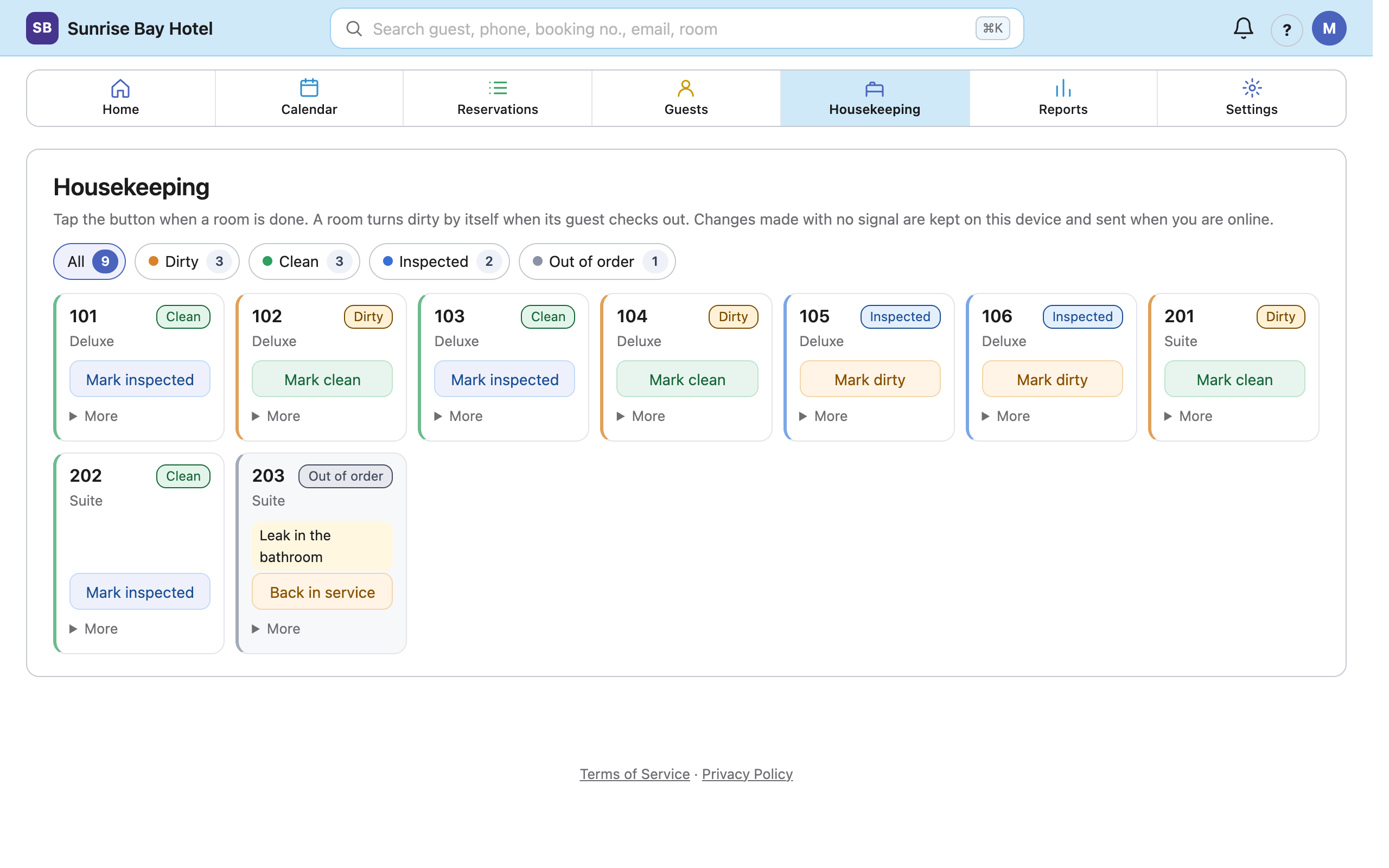
Housekeeping is a board of your rooms for the people who clean them. It is made for a phone in a corridor: one clear button per room.
#Before you start
The board lists your numbered rooms. If you have not numbered them yet, the page says so. Numbers are added under Settings, Property, Room numbers: type them as 101, 102, 201-205 under each room type. See Hotel settings.
The Housekeeping tab is shown to hotels that run their rooms in this panel. If your own hotel software runs the front desk, the board is kept there.
#What the board shows
Each room is a card with its number, its room type and one of four states:
| State | Meaning |
|---|---|
| Dirty | Needs cleaning. A room turns dirty by itself when its guest checks out. |
| Clean | Cleaned and ready. A room nobody has said anything about is clean. |
| Inspected | Cleaned and checked by a supervisor. |
| Out of order | Cannot be used (a leak, a broken lock). It stays out of order after a guest leaves, until you put it back in service. It is also taken off sale: the rooms to sell for its room type go down by one, from the day you mark it until you put it back, in the Calendar, on your booking page and on any connected booking site. If a reservation is still to stay in that room, the card tells you: move the reservation to another room. |
A card can also carry a tag for today: Arriving today (somebody is to arrive in this room), Leaving today (its guest leaves today) or In the house. No guest is named on the board.
The cards are in room-number order, smallest first, and a card never moves when you change it: only its colour and button change. The buttons at the top (All, Dirty, and so on, each with a count) show only the rooms in one state.
#Marking a room
Every card has one button for the next step:
- on a dirty room: Mark clean;
- on a clean room: Mark inspected;
- on an out-of-order room: Back in service (it becomes dirty, because it needs cleaning first).
Choose More on a card to set any other state, or to write a Note such as "leak in the bathroom". The note stays with the room until you change or clear it.
#With a weak signal
You can mark rooms even when the signal is bad or gone. What you did stays on your device, the card shows it at once, and a message says "Waiting for signal: {n} change(s) will be sent as soon as you are online." Choose Send now to try again; it is also sent by itself when you are online again.
Each change carries the time you made it. If a colleague changed the same room later than you, theirs stays and yours does not overwrite it, so the board never goes back to an older state. If there is no connection when the page opens, it shows the last board it saw, and says at what time.
#On your phone's home screen
Housekeepers use the board from a phone, often where the signal is poor. Open the panel once while you have a signal, then add it to the home screen: in Chrome on Android choose Install app (or Add to Home screen), in Safari on iPhone choose Share, then Add to Home Screen. The icon opens the panel like an app.
After that the panel opens even with no signal at all: it keeps the page itself on the phone (never your data) and shows the last board it saw, with the time. Whatever you mark is kept and sent when the signal returns. This works on the real site (it needs a secure https:// address); the panel loads a new version by itself whenever there is a signal.
#Who can use it
Anybody on your team who may work with bookings: Staff and above can change a room, View only can only look. Every change is written in the hotel's history with who made it and when.