#Plan, free trial and billing
Updated Nov 24, 2026
Antero is prepaid, like a phone with credit: you keep a balance, a small fee is worked out for each day, and once a month the fees are taken from the balance. There is no card on file and nothing is charged by surprise.
Everything is under Settings, Plan & Billing.
#The free trial
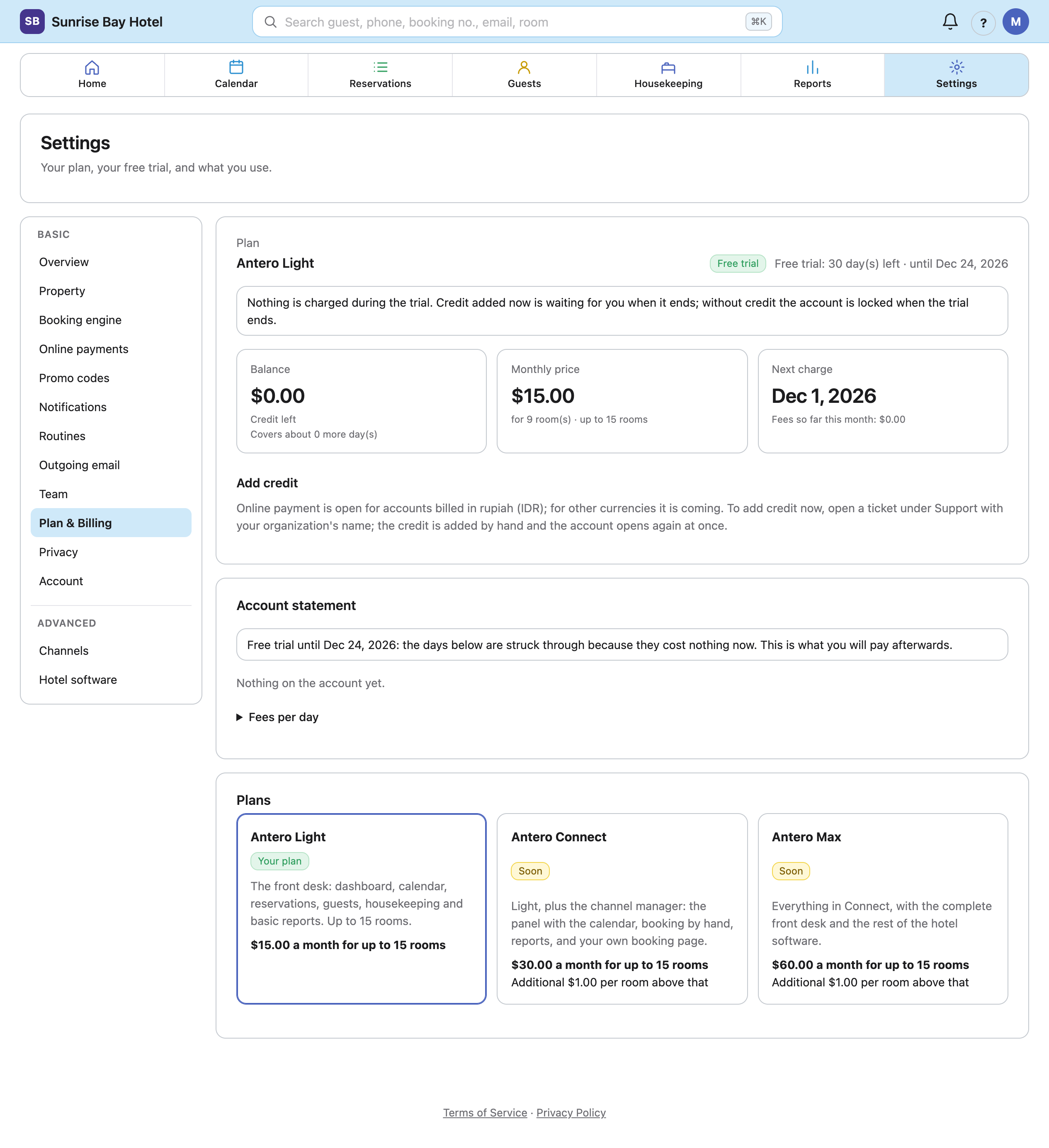
The first 30 days are free, with no card. The top of the page says how many days are left and the date it ends.
Nothing is charged during the trial. Credit added now is waiting for you when it ends; without credit the account is locked when the trial ends.
#What you pay
The price depends on your plan and on how many rooms you have, in steps (for example "up to 15 rooms"). The page shows the Monthly price for your rooms and the step it falls in. If you have more rooms than the largest step, the price is agreed with you, and until then the largest step is charged.
The prices are in the currency your account is billed in. An account made in Indonesian is billed in rupiah; made in any other language it starts in US dollars. You cannot change it yourself; write to support if you need another currency.
Each card under Plans writes the price of that plan for its first step, and, where the plan has one, what each additional room adds a month once you go past the largest step. So you can see what a bigger hotel will cost before you choose. The numbers in the panel are always the ones that count.
#How the charge works
- Every day a fee is worked out: the monthly price spread over the days of the month, for the rooms you had that day.
- On the 1st of each month, the fees of the month before are taken from your balance in one charge, shown in your statement as "Charge for
". - Your balance is the credit you added, minus the charges.
A fee is worked out each day from your rooms. On the 1st of each month the fees of the month before are taken from your balance.
#The trial days are shown struck through
During the free trial you do not pay, but you can still see what each day would cost. Open Fees per day: each day of the trial shows its fee crossed out with a Free trial label, and the total for the month is crossed out too. After the trial, the same days show the real fee. Nothing is taken from your balance for the crossed-out days.
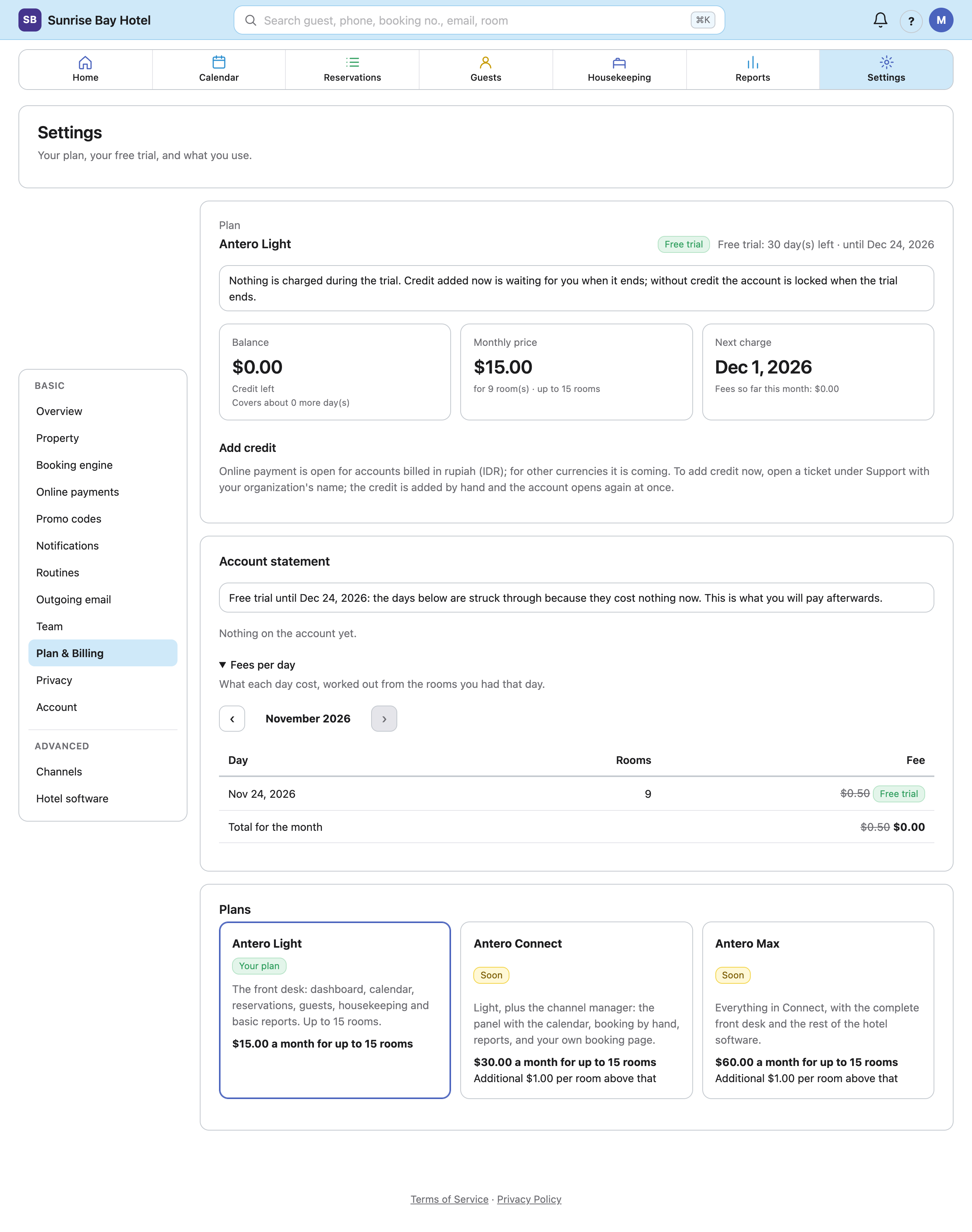
Use the arrows to look at other months.
#The account statement
The Account statement lists every credit and every charge with the balance after each line. You can see exactly where the balance went. While the trial runs, a note above it tells you the date the trial ends.
#Adding credit
Under Add credit you add credit to the balance.
If your account is billed in rupiah (IDR), an owner or an admin pays online, with Duitku or DOKU (the page shows a button for each provider we have set up):
- Pick one of the amounts, or type another one in Another amount (rupiah). The smallest amount is Rp 10.000.
- Press the button that names the amount and the provider (Pay … with Duitku or Pay … with DOKU). The provider's payment page opens, where you choose bank transfer (virtual account), QRIS, an e-wallet or a card.
- Pay. The provider sends you back to the Billing page, which says: "Waiting for the payment to be confirmed. This usually takes a few seconds."
- The credit is added as soon as the provider confirms the payment, usually within seconds. The page then says the payment was received, and the new line is on the Account statement. You do not need to do anything else, and a payment is never counted twice.
If the page says it has not heard about your payment yet, do not pay again: a payment that went through shows up on its own, and you can write to support if it does not.
For any other currency, Online payment is open for accounts billed in rupiah (IDR); for other currencies it is coming. To add credit now, open a ticket under Support with your organization's name; the credit is added by hand and the account opens again at once.
Credit you add during the trial is waiting for you when the trial ends.
#When the balance runs low
| Situation | What happens |
|---|---|
| The balance is above zero | Everything works. |
| The balance is below zero after a charge | You have 7 days of grace. Everything still works, and a message on the Billing page says by which date to add credit. We also email you. |
| The grace ends without credit, or the trial ends without credit | The account is locked: only the Billing page and sign-in work. Everything you entered is kept. |
| You add credit | The account opens again by itself, right away. |
While the account is locked you cannot work in the panel, but everything you entered is kept, and it is all there when the account opens again.
#Changing your plan
The Plans section shows the plans side by side. Choose the one you want; an owner is asked to confirm first. From the day you switch, your daily fee follows the new plan, and the days already used keep their price.
Antero Connect and Antero Max show "Soon": they cannot be chosen yet. We will announce them in the panel when they open.
If you have more rooms than your plan allows, the top of the page says so and what to do about it.
#Closing the account
An owner can close the account at any time, under Account. See Help, support and your data.